WhatsApp Call
このページは 日本語 ではまだ利用できません。デフォルトの言語 (English) で表示しています。
WhatsApp Call
WhatsApp Call is a feature that lets businesses receive and make WhatsApp voice calls directly from Cekat AI, on both web and mobile. With this feature, businesses can communicate not only through chat but also through voice calls, improving the customer experience and speeding up communication.
WhatsApp Call Features
Customer-Initiated Call
When a customer calls through WhatsApp and the conversation is still being handled by the AI, the system looks for an available agent and sends a User Initiated Call notification. The agent who receives the notification can answer right away and talk to the customer through the call window in Cekat or from a mobile phone. During the call, agents can manage the conversation, mute, or end the call as needed. If no agents are online, the system automatically selects a Super Agent to handle the call.
Business-Initiated Call
Agents can call a customer after first sending a request permission. If the customer approves the request, the agent can make the call right away from web or mobile. Throughout the call, the agent has full control to manage the conversation, mute the microphone, or end the call at any time.
Managing a Connected Call
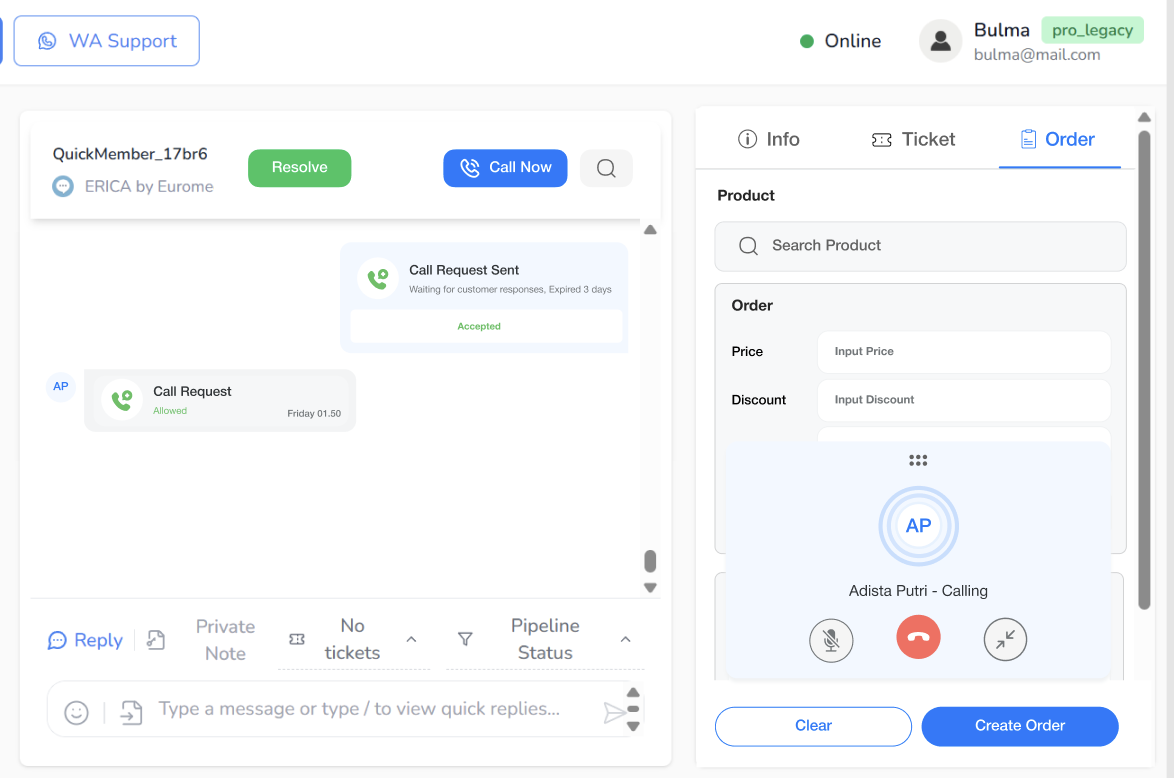
While a call is in progress, agents can take several actions directly from the call window:
- See the call duration in real time
- Use the mute/unmute feature to control audio
- End the call if needed
This feature ensures agents keep full control over communication during the call, on both web and mobile.