Session-Only Memory This feature controls whether the AI remembers context from previous conversation sessions. It is useful when you want the AI to treat each conversation independently, without being influenced by earlier history.
Separation of CRM User and CRM Chat CRM is now split into two separate modules: CRM User and Chat User. Check it out
Custom Role Hierarchy in CRM User You can now set up your own role hierarchy in CRM User to match your organizational structure, giving you more flexibility in managing access and team responsibilities.
More Powerful CRM Contacts The contact feature in CRM is now more complete: you can add views inside the contact page to see data from different perspectives as needed. Check it out
Two Contact Display Modes: Table & Kanban CRM contacts now support two display modes: Table for viewing data in a structured way, and Kanban for visual management based on status or stage.
Per-View Filters with Save as View Each view in CRM contacts can have its own filters and be saved as a separate view, so you can go straight to the relevant data without resetting filters every time.
CRM B2B Layout Setting You can now configure the B2B layout directly from the Board Setting page, giving you more control over how business data is displayed on your board. Check it out
Performance & Stability Improvements Various internal improvements were made to boost the overall speed and stability of CRM.
This feature lets you create a custom form to collect customer data before a livechat session starts. You can add various field types as needed and decide which information customers must fill in, making initial identification easier in the dashboard. Check it out
IP Blacklist for Live Chat You can now block specific IPs from accessing Live Chat on your website. This feature helps prevent spam or unwanted visitors from entering the Live Chat widget. IP Blacklist settings can be managed directly from the settings page and conversation details. Check it out
OTP Broadcast Verification You can now enable OTP verification when sending broadcast messages. The OTP can be sent to one of three options:
Registered business email
Authorized Roles (such as SPV or Super Agent)
A custom email that you specify
2FA Authentication Users can now enable Two-Factor Authentication to add an extra layer of security to their accounts.
Improvements
Force Change Password On 20 January at 10:00 PM WIB, all users will be automatically logged out and asked to change their password to meet the new security standard. This step is taken to strengthen overall protection of Cekat.
AI Assistant You can now use the Assistant feature in Cekat.AI to help you run the platform. The Assistant can answer questions about features, give suggestions or templates, show step-by-step guidance based on the page you have open, and even read images uploaded by customers. You can also ask it about topics outside the platform.
Evaluation AI If an AI answer feels off, you can now revise it directly. From there, the AI will learn and become more accurate at answering similar questions in the future.
AI Orchestration You can make an AI automatically switch to another AI agent when certain conditions are met, based purely on the conditions you set rather than the flow order. Ideal if you use multiple AIs in a single flow.
New Analytics (Session Based) The reporting system is now more accurate because everything is calculated per session instead of per conversation. As a result, AI, agent, and SLA performance is much more real-time and detailed.
Customer Journey See all of a customer's interaction traces with the Customer Journey feature, from internal events like assigning an agent or changing a label to external events like ad clicks, form submissions, or visits to specific pages.
SLA Management Set response targets for each platform using SLA. You can configure them by priority, time, and channel, so team performance is better directed and easier to evaluate.
AI Auto Resolve Conversations already handled by the AI can be resolved automatically after a set time, so the dashboard doesn't pile up and performance metrics stay clean.
Cekat Marketing This new product helps you monitor ad performance and the customer funnel. It includes dedicated dashboards for leads, sales, and events. You can also manage Meta ads directly from here and track traffic sources using a code placed on your landing page.
AI Integration
CRM Integration The AI can now fill in data on your CRM board directly based on the conversation. You can configure when and how the AI performs updates through the prompt configuration.
Image Edit The AI can edit images uploaded by customers, create new images from a prompt, or even perform complex image manipulation according to the rules you set.
File Generator The AI can automatically create files such as PDF, Excel, Word, or CSV based on your instructions. The output can be tailored through the prompt to look neat and professional.
Web Search For questions that need real-time data, the AI can search the internet directly and give up-to-date answers.
**AI not responding after a conversation is **resolvedvia batch action Fixed a bug where the AI could not respond to follow-up chats after the previous conversation was resolved using the batch resolve feature. The AI can now respond again when a new chat comes in.
Unable to chat with a customer after the customer makes a direct call with no prior chat history When a customer made a direct call via WhatsApp without any previous chat, the system stored the WA ID instead of the WhatsApp number.
Auto-Update WABA ID When WhatsApp Inbox Is Reconnected When a business changes its WABA ID, you now only need to Reconnect the WhatsApp inbox from the Connected Platform page. The system will then automatically fetch and update the WABA ID.
[BUG] Private Notes and System Messages Visible to Customers in Livechat On the Web Live Chat platform, internal private notes and system messages were briefly visible to customers. These internal messages are no longer sent to customers and can only be seen internally.
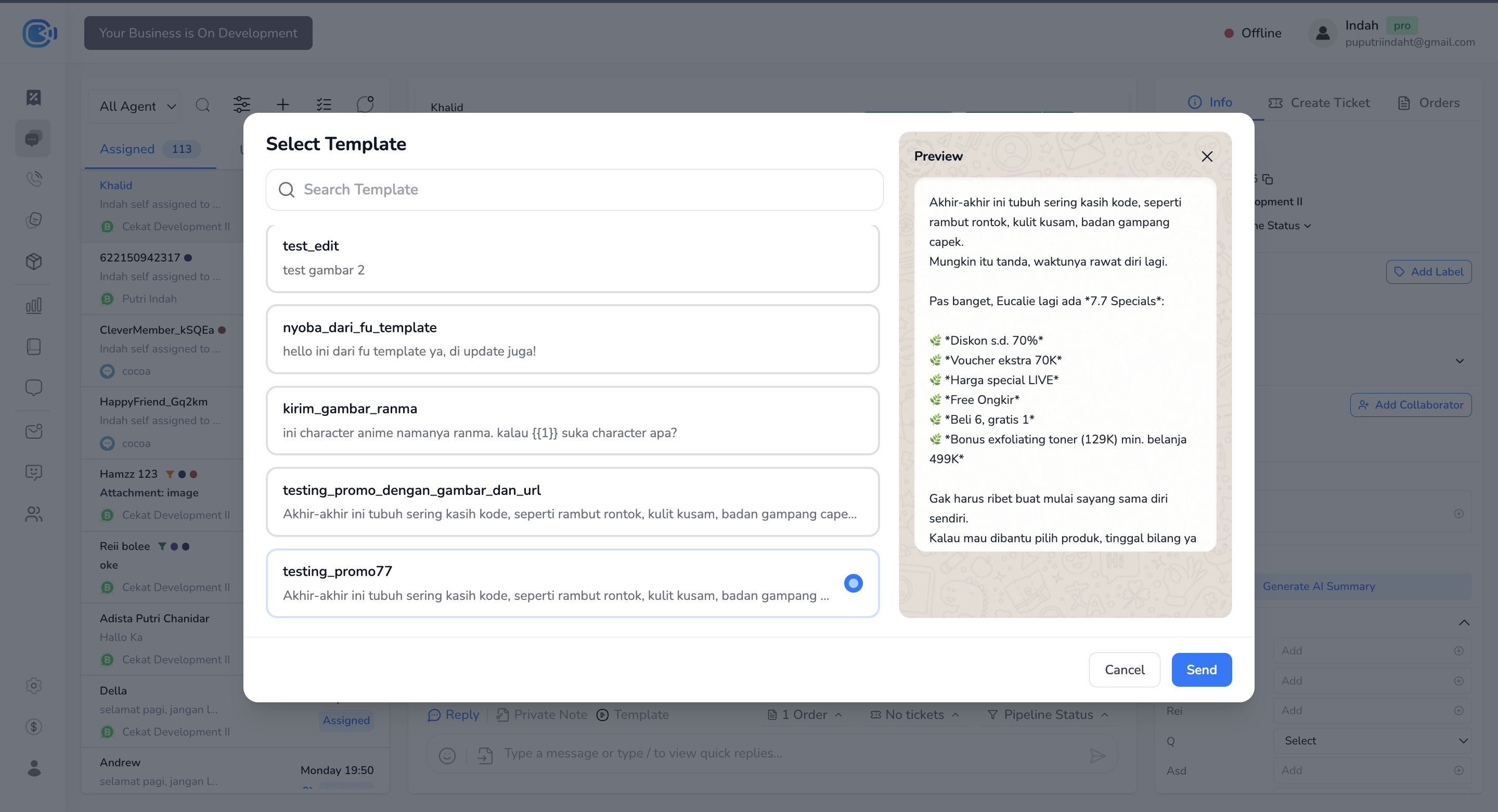
Send WhatsApp Template While Conversation is Open Users can now send WhatsApp template messages even when the conversation is still in open status. The template selection popup was also revamped to be more intuitive.
Team Tab in “Handled By” Selector In the Handled By menu, there are now two tabs:
Agent: Shows all agents as before.
Team: Shows agents by team group, or lets you assign directly to a specific team. It can also be set to auto-distribute to that team's members.
Bulk Edit Collaborators in Conversations Users can now add or update collaborators in bulk across multiple conversations at once.
Improvements
Conversation Filter Enhancement The conversation filter now supports searching by No Label, Multi-Agent, and Multi-Inbox, for more flexible filtering.
Search Agent in Working Hour Setting Added agent search to the Working Hour settings page.
Allow Copying Text in Bubble with Media Users can now copy text from bubbles that contain text + media (previously not possible when media was present).
Auto-Handoff Instagram Share-Type Messages to Human Agent If a customer sends a shared post, story, or reel via Instagram DM, the system now automatically hands off to a human agent because the AI cannot reply to it.
Extend WhatsApp Session to 72 Hours for CTWA-Originated Chats Conversations that originate from Click-to-WhatsApp Ads (CTWA) now stay open for 72 hours.
Bug Fixes
[BUG] Double Label Allowed via Webhook/API Duplicate labels could get in through the API/webhook even though the UI was validated. The system now blocks duplicate labels from all input paths.
[BUG] PDF File Upload Blocked – 16MB Limit Instead of 100MB PDF files larger than 16MB failed to send, even though WhatsApp supports up to 100MB. The system now accepts files up to WhatsApp's official limit.
[BUG] AI Not Responding – Error from Provider (OpenAI/Gemini) An error from the provider (OpenAI/Gemini) prevented the AI from responding to users. To avoid conversations stalling, the system now automatically performs a handoff to a human agent, accompanied by a system message:
"AI encountered an error and could not respond. Conversation handed off to Agent X"
Auto-Reassign When Assigned Agent Goes Offline You can now enable a setting so the system automatically reassigns the chat to another agent if the assigned agent goes offline. This setting is available on the Connected Platform page, at the bottom of the platform you select.
Improvement
System Message on Auto-Assign from AI (Call Triggered) When the AI auto-assigns an agent because of a call request, a system message now appears in the chat to notify about the change.
Edit Recipient by Delete & Re-Add On the broadcast page, users can now edit the recipient list by deleting and re-adding recipients without having to start over.
Broadcast Analytics Uses Funnel Logic Broadcast statistics are now calculated using funnel-based logic (for example, Read also counts as Delivered and Sent), instead of exclusive statuses counted one by one.
Search Ticket by Ticket Number You can now search for tickets directly by ticket number, making it easier to find and track specific conversations.
Quick Reply Search by Content The quick reply search was improved and can now search by content, not just by title.
Bug Fixes
[BUG] Agent Reply Message Error – Missing context['message_id'] Agents failed to send replies because the message_id context was missing, causing an error during the reply process.
AI Send Files Directly (XLSX, DOCX, PPTX) The AI can now send files in .xlsx, .docx, and .pptx formats directly to customers via chat.
Redesign Batch Edit & Add Batch for Pipeline Editing The batch edit view was redesigned. Pipeline batch editing was also added.
UX Behavior Update
Transfer Indicator When Chat Is Reassigned When a chat is reassigned to another agent, a [Trasnferred] indicator now appears showing that the chat has moved Handled by someone else. This makes it easier for agents to see that the conversation was transferred to another team.
Bug Fixes
[BUG] Chat Sent by AI Failed Messages that should have been sent by the AI failed to send in certain conditions; they will now be retried.
Instagram Unsent Message Handling If a customer unsends a message on Instagram, the message is still shown in the Cekat dashboard and labeled “This message was deleted”.
Bug Fixes
[BUG] FAQ Analysis Pulls Conversations with Null Inbox FAQ analysis previously pulled data from conversations without an inbox ID, making the results irrelevant.
[BUG] Conversation Not Visible When Missing Business ID Conversations did not appear if the business ID was missing. The view now adapts so the conversation remains visible to the relevant agent even when the business ID is incomplete.
Private Note in Unread Count Indicator Private notes are now included in the unread messages indicator in chat. This helps agents and supervisors avoid missing internal notes they haven't read yet.
Persistent Message Bubbles Until Replied Customer message bubbles now remain visible even when a system message comes in. A bubble only disappears after the message is replied to, to prevent customer messages from being missed.
New Date Range Filter for Last Message (Contact Page) Previously the date filter on the contact page only applied to created at. A filter option based on last message has now been added, so users can filter contact data by their last interaction, not just by creation time.
Bug Fixes
[BUG] AI Assigns Multiple Different Human Agents The AI inconsistently assigned more than one human agent to a single conversation.
[BUG] Inbox Created but Not Appearing on Connected Platform The inbox was created successfully but did not appear on the Connected Platform.
Disable Edit Template Call Meta currently does not allow editing call templates. To prevent errors, the edit option for call templates is temporarily disabled.
Bug Fixes
Error Generating FAQ for 7-Day Range or Less The system failed to process FAQ Analytics when the selected period was 7 days or less.
Human Agent Analytics Missing Data with 1-Day Filter Agent analytics showed no data when the time filter was set to just 1 day.
Analytics Report and Contact Data Show Different Results There was a mismatch between the data on the analytics report page and the data on the contact page.
Clone AI Agent You can now duplicate an AI agent directly from the AI Agent page. Just select the AI you want to duplicate, click the Copy button, then enter a name for the new AI in the modal that appears. This makes it easy to create another version of an existing AI without starting from scratch.
Bug Fixes
[BUG] AI Misassigns Human Agent to Wrong Division Fixed a bug that caused the AI to assign a human agent to the wrong division.
[BUG] Unable to Send Call Template (Business Initiated) Fixed a bug that caused call templates to fail to send for business-initiated messages.
Campaign Message Details Campaign details now show complete statistics such as the number of sent, delivered, replied, and failed for each message sent. Check it out
Send Call Request Call requests can now be sent using a custom message, without needing a template, as long as the conversation is in open status. A preview of the message to be sent to the customer was also added. Check it out
Call Transcript & Recording After a call ends, you can immediately view its transcript and audio recording on the call details page. Both can also be downloaded. Check it out
Private Note/snooze Reminder (WhatsApp Only) When creating a private note, you can set a reminder before sending it to your team. The system will resend the private note at the time you set. Currently only available for WhatsApp. Check it out
CRM Improvements Several refinements to CRM in terms of performance and usability.
CRM Webhook & Actions CRM now supports webhooks and custom actions for automation or integration with other systems based on specific events inside CRM.
Billing Transaction Pagination The transaction history in billing now supports pagination, so you can access your entire transaction history, not just the last 10.
Bug Fixes
AI Not Replying After Order via WhatsApp Catalogue Fixed a bug that caused the AI to stop replying after a customer placed an order through WhatsApp Catalogue.
WhatsApp Call(Beta Tester Only) Users registered as beta testers can now try the direct calling feature via WhatsApp from within Cekat. Check it out
Order & Payment(Beta Tester Only) The order and payment feature is now available to beta testers. Users can create manual orders, manage invoices, and receive payments through a payment link (Xendit). Check it out
Working Hour You can now set agent working hours so that online/offline status changes automatically at the specified times. It also supports holidays and special hours. Check it out
AI Evaluation A new feature that lets users evaluate and edit AI answers directly from the chat page, to improve the quality of AI responses going forward. Check it out
Workflow Automation (n8n Integration) Cekat AI can now be integrated with n8n to build more flexible and powerful automation workflows, directly from the Workflow Automation page. Check it out
Webhook Integration The webhook feature lets you receive real-time data about important activity in Cekat, such as new chats, completed conversations, or other status changes. Ideal for integrating with CRM, internal systems, or notification automation. Check it out here
New AI model : AI Vision The AI now supports a vision model that can read PDFs, files, and videos directly from conversations. Very useful for analyzing documents, visual materials, or other multimedia content.
AI Temperature Setting Users can now set how creative the AI is in its responses: Consistent, Balanced, or Creative, to suit your business needs.
Improvement
AI Spam Checker The AI system now includes a spam checker to prevent irrelevant conversations, such as the AI replying to another AI. This helps keep the chat flow clean and efficient.
Bug Fixes
Fix Analytics Issue Fixed a bug in the analytics system so data is displayed more accurately and consistently.
Business Report in AI Analytics On the AI Analytics page, users can now generate a business report on a topic of their choice. The AI analyzes the available conversations and automatically compiles a report for that topic. Check it out
API Log Users can now view logs of messages sent via the API directly on the API settings page, making debugging and activity tracking easier. Check it out here
Handle Block User A new feature to block a user directly from the conversation details page, in the AI agent access section.
Typing Indicator for AI A “typing…” indicator now appears while the AI is typing a reply to a customer. (Currently only for the AI, not yet available for human agents.)
Other Minor Improvements A few other small improvements for stability and ease of use.
Broadcast Template Authentication Users can now use a dedicated template to send OTP or verification codes via WhatsApp. Check it out
Pipeline A new feature to track the status of each conversation, such as Leads, Purchase, or Repurchase, with only one active status per chat. Check it out
Ticket Multiple Board Users can now create more than one board for tickets, for example by division, project, or specific workflow. Ideal for teams handling several lines of work at once. Check it out
Templates are no longer per inbox but per WABA ID. The WABA ID info can be seen directly on the template list page.
Revamp chat filter component – the look and function of the chat filter were updated to be more intuitive.
Implementation of Teams in Flow – users can now select a team, not just a human agent.
UX improvements when creating a new agent
The ticket resolve system was improved:
Agents can only see chats they resolved,
SPVs can see those resolved by their team,
Super Agents can see all of them.
Minor improvements on the ticket and knowledge source pages.
Skip Last AI Agent Response (Flow) A new improvement in Flow: when enabled, the AI agent will not reply to the user's last message before the flow ends. Ideal for scenarios where you want the flow to finish without an extra AI response. See here