> For the complete documentation index, see [llms.txt](https://docs.cekat.ai/llms.txt). Markdown versions of documentation pages are available by appending `.md` to page URLs; this page is available as [Markdown](https://docs.cekat.ai/en/additional-information/changes-log.md).
# Changes Log
### **6 April 2026 — New Feature**
* **Session-Only Memory** Controls whether the AI remembers context from previous conversation sessions. Handy when you want the AI to treat each conversation on its own, without being influenced by earlier history.
### 26 March 2026 — CRM Improvement
**Improvements**
* **CRM User and CRM Chat are now separate** CRM is now split into two modules: CRM User and Chat User. [See details](https://docs.cekat.ai/en/crm/crm-user-settings)
* **Custom role hierarchy in CRM User** You can now set up your own role hierarchy in CRM User to match your organization, giving you more flexibility in managing team access and responsibilities.
* **More powerful CRM contacts** CRM contacts are now more complete: you can add *views* inside the contacts page to look at your data from different angles. [See details](https://docs.cekat.ai/en/crm/contacts)
* **Two contact view modes: Table and Kanban** CRM contacts now support two views: **Table** for structured data, and **Kanban** for visual management by status or stage.
* **Per-view filters with Save as View** Each view in CRM contacts can have its own filters and be saved as a separate view, so you can jump straight to the data you need without setting filters up again.
* **CRM B2B layout setting** You can now set up the B2B layout directly from the **Board Setting** page, giving you more control over how business data appears on your board. [See details](https://docs.cekat.ai/en/crm/board-settings)
* **Performance and stability improvements** Various internal fixes to make CRM faster and more stable overall.
#### 6 March 2026 — Live Chat Custom Form
* Create a custom form to collect customer details before a *live chat* session starts. You can add different *field* types and choose which details customers must fill in, making it easier to identify them in the dashboard from the start. [See details](https://docs.cekat.ai/en/ai-and-platform/connected-platforms/web-livechat-inbox/custom-form-livechat)
#### 13 February 2026 – New Feature
* **IP Blacklist for Live Chat**\
You can now block specific IP addresses from accessing Live Chat on your website. This helps keep spam and unwanted visitors out of your Live Chat widget. IP Blacklist can be managed from the settings page and from conversation details. [See details](https://docs.cekat.ai/en/chat/ip-blacklist-livechat)
#### **20 January 2026**
**New features**
* **OTP broadcast verification**\
You can now turn on OTP verification when sending broadcast messages.\
The OTP can be sent to one of three options:
* Your registered business email
* Authorized roles (such as SPV or Super Agent)
* A custom email of your choice
* **2FA authentication**\
Users can now turn on *two-factor authentication* for an extra layer of security on their account.
**Improvement**
* **Forced password change**\
On 20 January at 22:00 WIB, all users will be logged out automatically and asked to change their password to meet the new security standard.\
This is to strengthen Cekat's protection across the board.
#### 19 November 2025 – Major Update
* **AI Assistant**\
You can now use the Assistant in Cekat.AI to help you run the platform. It can answer questions about features, suggest ideas or templates, walk you through steps for the page you're on, and even read images uploaded by customers. You can ask it about things outside the platform too.
* **Evaluation AI**\
If an AI answer doesn't feel right, you can now revise it directly. The AI learns from this and gets more accurate at answering similar questions in future.
* **AI Orchestration**\
Set the AI to switch to another AI agent automatically when certain conditions are met. It's not based on flow order, purely on the conditions you set. Great if you use several AIs together in one flow.
* **New Analytics (session-based)**\
Reports are now more accurate because everything is counted by session rather than by conversation. That makes AI, agent and SLA performance far more real-time and detailed.
* **Customer Journey**\
See every customer interaction with Customer Journey, from internal events like agent assignments and label changes to external events like ad clicks, form submissions or visits to specific pages.
* **SLA Management**\
Set response targets for each platform with SLAs. You can set them by priority, time and channel, so team performance is more focused and easier to evaluate.
* **AI Auto Resolve**\
Conversations handled by the AI can be resolved automatically after a set time, so your dashboard doesn't pile up and your performance metrics stay clean.
* **Cekat Marketing**\
A new product that helps you track ad performance and customer funnels, with dedicated dashboards for leads, sales and events. You can also manage Meta ads right here and track where traffic comes from with a code snippet on your landing page.
* **AI Integration**
* **CRM Integration**\
The AI can now fill in your CRM boards directly based on conversations. You decide when and how it updates them through prompt configuration.
* **Image Edit**\
The AI can edit images uploaded by customers, create new images from a prompt, or even handle complex image manipulation following the rules you set.
* **File Generator**\
The AI can automatically create files such as PDF, Excel, Word or CSV based on your instructions. You can fine-tune the output with a prompt so it looks neat and professional.
* **Web Search**\
For questions that need real-time data, the AI can search the internet directly and give an up-to-date answer.
#### 13 **October 2025 – Bug fixes**
* **AI not responding after a conversation was resolved via batch action**\
Fixed a bug where the AI couldn't respond to follow-up chats after the previous conversation was resolved with *batch resolve*. The AI now responds again when a new chat comes in.
* **Couldn't chat with a customer after they made a direct call with no previous chat history**\
When a customer made a *direct call* over WhatsApp without any earlier chat, the system saved their WA ID instead of their WhatsApp number. This has been fixed.
#### 9 **October 2025 – Improvement**
**WABA ID auto-updates when a WhatsApp inbox is reconnected**\
If a business changes its WABA ID, all it needs to do now is *Reconnect* the WhatsApp inbox from the Connected Platform page. The system then fetches and updates the WABA ID automatically.
#### **2 October 2025 – Bug Fixing**
* **\[BUG] Private notes and system messages visible to customers in Live Chat**\
On Web Live Chat, private notes and internal system messages were briefly visible to customers. These internal messages are no longer sent to customers and can only be seen internally.
#### **1 October 2025 – New Features, Improvements & Bug Fixing**
*New features:*
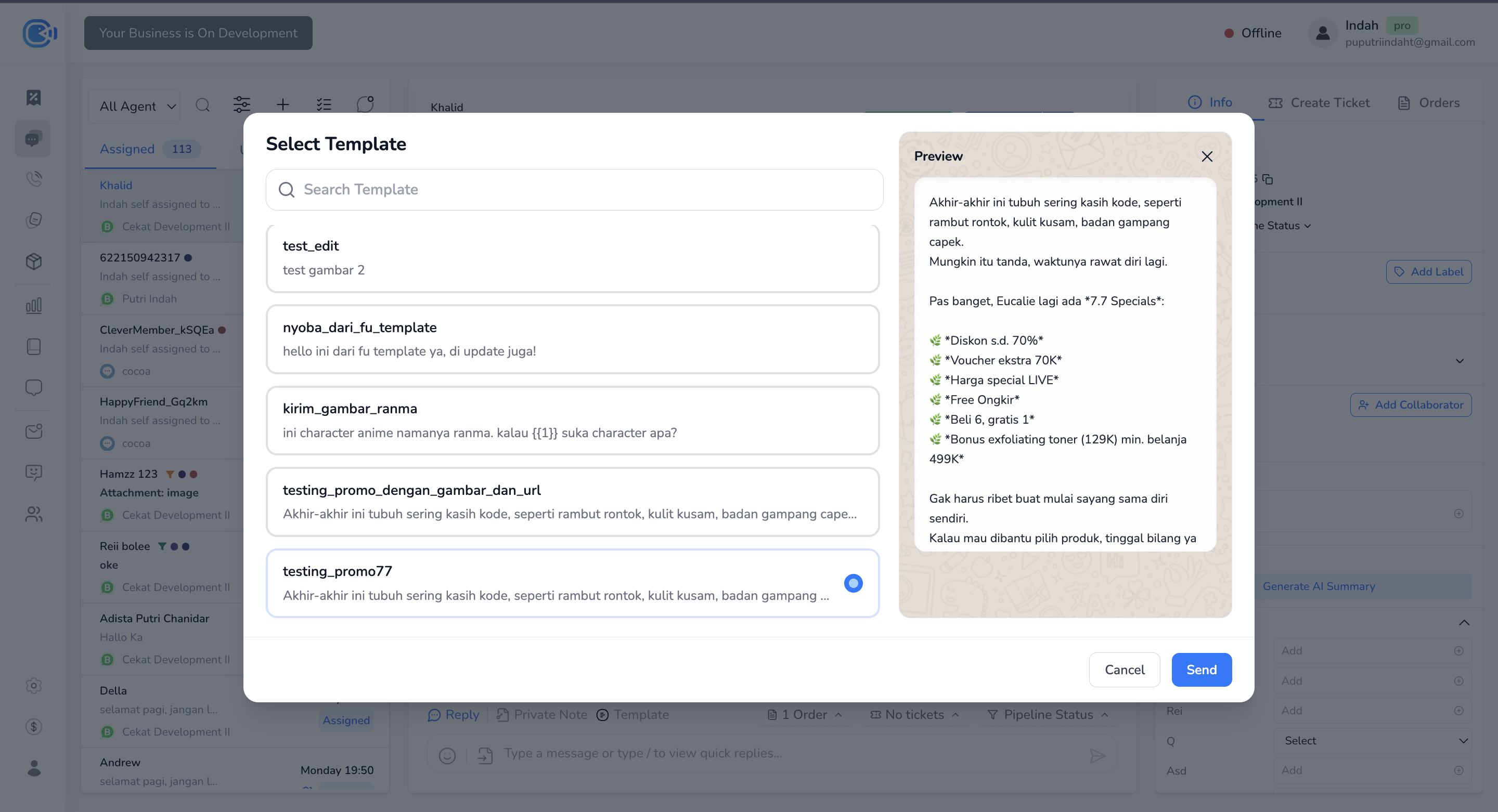
* **Send WhatsApp templates while a conversation is open**\
You can now send a WhatsApp template message even while the conversation is still *open*. The template picker popup has also been **redesigned** to be more intuitive.
* **Team tab in the “Handled By” selector**\
The **Handled By** menu now has two tabs:
* **Agent:** shows all agents, as before.
* **Team:** shows agents grouped by team, or lets you assign directly to a specific team. It can also be set to *auto-distribute* to that team's members.
* **Bulk edit collaborators in conversations**\
You can now add or update **collaborators in bulk** across several conversations at once.
*Improvements:*
* **Better conversation filters**\
Conversation filters now support **No Label**, **Multi-Agent** and **Multi-Inbox** for more flexible filtering.
* **Search agents in Working Hour settings**\
You can now search for agents on the **Working Hour** settings page.
* **Copy text from bubbles with media**\
You can now copy text from bubbles that contain **text + media** (before, text couldn't be copied if there was media).
* **Instagram share-type messages hand off to a human agent automatically**\
If a customer sends a **shared post, story or reel** via Instagram DM, the system now hands off to a human agent automatically, since the AI can't reply to these.
* **WhatsApp session extended to 72 hours for CTWA chats**\
Conversations that come from **Click-to-WhatsApp Ads (CTWA)** now stay open for **72 hours**.
*Bug fixes:*
* **\[BUG] Duplicate labels allowed via webhook/API**\
Duplicate labels could come in through the API or webhooks even though the UI validated them. The system now blocks duplicate labels from every input path.
* **\[BUG] PDF uploads blocked at 16MB instead of 100MB**\
PDF files over 16MB failed to send, even though WhatsApp supports up to 100MB.\
The system now accepts files up to WhatsApp's official limit.
#### **30 September 2025 – Bug Fixing**
* **\[BUG] AI not responding – error from the provider (OpenAI/Gemini)**\
An error from the provider (OpenAI/Gemini) stopped the AI from responding to users. To keep conversations from stalling, the system now **hands off to a human agent** automatically, with a **system message**:
> *"AI encountered an error and could not respond. Conversation handed off to Agent X"*
#### **18 September 2025 – New Settings, Improvements & Bug Fixing**
*New setting:*
* **Auto-reassign when the assigned agent goes offline**\
You can now have the system automatically *reassign* a chat to another agent when the assigned agent goes offline. Find this setting on the **Connected Platform** page, at the bottom of the platform you choose.
*Improvements:*
* **System message on AI auto-assign (call triggered)**\
When the AI auto-assigns an agent because of a call request, a **system message** now appears in the chat to let you know.
* **Edit recipients by deleting and re-adding**\
On the broadcast page, you can now edit the recipient list by removing and re-adding recipients, without starting over.
* **Broadcast analytics use funnel logic**\
Broadcast stats are now calculated with **funnel-based logic** (for example, Read also counts as Delivered and Sent), rather than one exclusive status each.
* **Search tickets by ticket number**\
You can now search for a ticket directly by its **ticket number**, making it easier to find and track specific conversations.
* **Search quick replies by content**\
**Quick reply** search has been improved, so you can now search by content, not just by title.
*Bug fixes:*
* **\[BUG] Agent reply error – missing context\['message\_id']**\
Agents couldn't send replies because the `message_id` context was missing, causing an error during the reply.
#### **16 September 2025 – Improvements & Bug Fixing**
*Improvements:*
* **AI sends files directly (XLSX, DOCX, PPTX)**\
The AI can now send **.xlsx**, **.docx** and **.pptx** files straight to customers in chat.
* **Redesigned batch edit, plus batch pipeline editing**\
The batch edit view has been redesigned, and batch editing for pipelines has been added.
*UX behavior update:*
* **Transfer indicator when a chat is reassigned**\
When a chat is *reassigned* to another agent, a \[Transferred] indicator now shows that its *Handled by* has changed. This makes it easy for agents to see that a conversation has moved to another team.
*Bug fixes:*
* **\[BUG] Chat sent by AI failed**\
Messages the AI should have sent failed under certain conditions. These are now retried.
**12 September 2025 – Improvement & Bug Fixing**
*Improvement:*
* **Handling unsent Instagram messages**\
If a customer *unsends* a message on Instagram, it still shows in the Cekat dashboard, marked *“This message was deleted”*.
*Bug fixes:*
* **\[BUG] FAQ analysis pulled conversations with a null inbox**\
FAQ analysis was pulling data from conversations with no inbox ID, which made the results irrelevant.
* **\[BUG] Conversation not visible when the business ID was missing**\
Conversations didn't appear if the business ID was missing. The view now adjusts so the conversation is still visible to the right agents, even if the business ID is incomplete.
**11 September 2025 – Improvements**
* **Private notes in the unread count**\
Private notes now count towards the **unread messages** indicator in chat, so agents and supervisors don't miss internal notes they haven't read.
* **Message bubbles stay until replied to**\
Customer message bubbles now stay visible **even when a system message comes in**. A bubble only goes away once the message has been **replied to**, so customer messages don't get missed.
**10 September 2025 – Improvement & Bug Fixing**
*Improvement:*
* **New last-message date range filter (Contacts page)**\
The date filter on the contacts page used to work only on *created at*. You can now also filter by **last message**, so you can find contacts based on their latest interaction, not just when they were created.
*Bug fixes:*
* **\[BUG] AI assigned multiple different human agents**\
The AI inconsistently assigned more than one human agent to a single conversation.
* **\[BUG] Inbox created but not showing on Connected Platform**\
An inbox was created successfully but didn't appear on the Connected Platform page.
#### **9 September 2025 – Bug Fixing & Adjustment**
*Adjustment:*
* **Editing call templates disabled**\
Meta currently doesn't allow call templates to be edited. To prevent errors, the edit option for call templates has been temporarily turned off.
*Bug fixes:*
* **Error generating FAQs for a range of 7 days or less**\
FAQ Analytics failed when the selected period was 7 days or less.
* **Human agent analytics missing data with a 1-day filter**\
Agent analytics showed no data when the time filter was set to just 1 day.
* **Analytics report and contact data showed different results**\
The data on the analytics report page didn't match the data on the contacts page.
#### **8 September 2025 – New Feature & Bug Fixing**
*New feature:*
* **Clone AI Agent**\
You can now duplicate an AI agent directly from the AI Agent page. Just choose the AI you want to duplicate, click **Copy**, then enter a name for the new AI in the dialog. It's an easy way to create another version of an existing AI without starting from scratch.
*Bug fixes:*
* **\[BUG] AI assigned a human agent to the wrong division**\
Fixed a bug where the AI assigned human agents to the wrong division.
* **\[BUG] Unable to send call templates (business initiated)**\
Fixed a bug where call templates failed to send for business-initiated messages.
#### **3 September 2025 – New Features & Improvements**
* **Campaign message details**\
Campaign details now show full stats, such as *sent*, *delivered*, *replied* and *failed* counts for every message. [See details](https://docs.cekat.ai/en/chat/broadcasts/broadcast-message-analytics)
* **Send call request**\
Call requests can now be sent with a custom message instead of a template, as long as the conversation is *open*. There's also a preview of the message the customer will receive. [See details](https://docs.cekat.ai/en/chat/whatsapp-call/how-to-use-whatsapp-call)
* **Call transcripts and recordings**\
After a call ends, you can see its *transcript* and *audio recording* on the call details page. Both can be downloaded. [See details](https://docs.cekat.ai/en/chat/whatsapp-call/call-details)
* **Private note/snooze reminder (WhatsApp only)**\
When creating a *private note*, you can set a reminder before sending it to your team. The system resends the private note at the time you set. Currently available for WhatsApp only. [See details](https://docs.cekat.ai/en/ai-and-platform/chat/chat-box)
* **CRM improvements**\
Several refinements to CRM performance and usability.
* **CRM webhooks and actions**\
CRM now supports webhooks and *custom actions*, for automations or integrations with other systems based on specific CRM events.
* **Billing transaction pagination**\
Billing transaction history now supports *pagination*, so you can see your whole transaction history, not just the last 10.
*Bug fixes:*
* **AI not replying after an order via WhatsApp Catalogue**\
Fixed a bug where the AI stopped replying after a customer placed an *order* through the WhatsApp Catalogue.
#### **4 August 2025 – New Features (Beta) & Improvements**
*New features:*
* **WhatsApp Call** *(beta testers only)*\
Users registered as beta testers can now try making calls over WhatsApp from inside Cekat. [See details](https://docs.cekat.ai/en/chat/whatsapp-call)
* **Order & Payment** *(beta testers only)*\
Ordering and payments are now available to beta testers. You can create manual orders, set up invoices and accept payments through a payment link (Xendit). [See details](https://docs.cekat.ai/en/order/setup-order)
* **Working Hour**\
You can now set agents' working hours so their online/offline status changes automatically at the times you choose. Holidays and special hours are supported too. [See details](https://docs.cekat.ai/en/chat-settings/working-hour)
#### **2 July 2025 – New Features & Improvements**
*New features:*
* **AI Evaluation**\
Evaluate and edit AI answers directly from the chat page, to improve the quality of AI responses going forward. [See details](https://docs.cekat.ai/en/ai-and-platform/ai-agent/evaluation-ai)
* **Workflow Automation (n8n integration)**\
Cekat AI can now integrate with n8n to build more flexible, powerful automation workflows, right from the *Workflow Automation* page. [See details](https://docs.cekat.ai/en/automation-and-developer/cekat-ai-workflow-automation)
* **Webhook Integration**\
Webhooks let you receive real-time data about key activity in Cekat, such as new chats, resolved conversations or other status changes. Great for integrating with your CRM, internal systems or notification automations. [See details](https://docs.cekat.ai/en/automation-and-developer/webhook-integration)
* **New AI model: AI Vision**\
The AI now supports a *vision model* that can read **PDFs, files and videos** directly from conversations. Very handy for analyzing documents, visual materials or other multimedia content.
* **AI temperature setting**\
You can now set how creative the AI is when it responds:\
*Consistent*, *Balanced* or *Creative*, whatever suits **your business**.
*Improvement:*
* **AI spam checker**\
The AI now has a spam checker to prevent irrelevant conversations, such as the AI replying to itself. This keeps chats clean and efficient.
*Bug fixes:*
* **Analytics fix**\
Fixed an analytics bug so data displays more accurately and consistently.
#### **27 May 2025 – New Features & Improvements**
* **Business Report in AI Analytics**\
On the AI Analytics page, you can now generate a *business report* on any topic you choose. The AI analyzes the available conversations and builds the report for you automatically. [See details](https://docs.cekat.ai/en/chat/old-analytics/ai-agent-analytics/business-report-analysis)
* **API Log**\
You can now see a log of messages sent through the API right on the API Setting page, making debugging and activity tracking easier. [See details](https://docs.cekat.ai/en/automation-and-developer/cekat-open-api)
* **Block users**\
A new option to block users directly from the conversation details page, under AI agent access.
* **Typing indicator for AI**\
A “typing…” indicator now appears while the AI is writing a reply to a customer. (Currently for AI only, not yet for human agents.)
* **Other minor improvements**\
Several other small improvements for stability and ease of use.
#### **21 May 2025 – New Features**
* **Broadcast template authentication**\
You can now use a dedicated template to send OTP or verification codes over WhatsApp. [See details](https://docs.cekat.ai/en/chat/broadcast-template-authentication-otp)
* **Pipeline**\
A new way to track the status of every conversation, such as Leads, Purchase or Repurchase, with only one active status per chat. [See details](https://docs.cekat.ai/en/chat-settings/pipeline)
* **Multiple ticket boards**\
You can now create more than one ticket board, for example by division, project or workflow. Great for teams handling several lines of work at once. [See details](https://docs.cekat.ai/en/chat/ticket/ticket-board/multiple-board)
#### **17 May 2025 – Improvements & Updates**
*Improvements:*
* Templates are no longer per inbox but per **WABA ID**. You can see the WABA ID on the template list page.
* **Chat filter redesign**: the chat filter has been updated to look and work more intuitively.
* **Teams in Flow**: you can now choose a **team**, not just a human agent.
* UX improvements when creating a new agent.
* The **resolve ticket** system has been improved:
* Agents can only see chats they resolved,
* SPVs can see chats resolved by their team,
* Super Agents can see everything.
* Minor improvements to the **ticket** and **knowledge source** pages.
* **Skip Last AI Agent Response (Flow)**\
A new Flow option: when turned on, the AI agent **won't reply to the user's last message** before the flow ends. Useful when you want a flow to finish without an extra AI response. [See details](https://docs.cekat.ai/en/chat/flow)
#### **13 May 2025 – Platform Improvement & Bug Fixing**
**Improvements:**
* Message status now updates to **"Failed"** when a campaign fails to send.
* Template buttons now show directly in Cekat chat.
* Template headers now support **text and documents**, for more flexible campaigns.
* Notifications now also appear on **Cekat Web**, not just mobile.
* You can now rename tabs in *Knowledge Source Text*.
* Flow is more stable and smoother, including:
* Support for sending **multiple images**,
* **Zoom in/out** buttons,
* Fixes for several minor bugs.
* **Ticket agent role update**:
* Agents can now only see tickets they created or that are assigned to them.
* SPVs can see every ticket in their team.
**Bug fixes:**
* **Soft delete** for recipient lists now works.
* Fixed templates that errored when no header was added.
* Fixed an issue in mobile chat where users were asked to send a template even though 24 hours hadn't passed.
#### **1 May 2025 – Huge Update: Major Revamp & New Features**
A big update bringing lots of important changes to the platform:
* **SLA and agent analytics**: track agent performance with new SLA metrics and analytics. [See details](https://docs.cekat.ai/en/chat/old-analytics/human-agent-analytics)
* **New AI model**: an upgrade to a new AI model that's faster, more accurate and more natural.
* **Human Agent & Team revamp**: a tidier team structure, with supervisor and team assignment. [See details](https://docs.cekat.ai/en/ai-and-platform/human-agents-and-teams)
* **CSAT setting**: set up your CSAT messages from start to finish, including the feedback page. [See details](https://docs.cekat.ai/en/chat/customer-satisfaction-score-csat)
* **Inbox revamp**: a cleaner inbox view and faster navigation. [See details](https://docs.cekat.ai/en/ai-and-platform/connected-platforms)
* **Sidebar and settings page revamp**: a simplified sidebar and a new settings page.
* **CAPI & MMlite**: more flexible data and metadata integration.
* **Netzme registration**: register for Netzme directly in the app to activate QRIS.
* **Tickets on mobile**: view your ticket list on mobile (view only).
#### **25 Apr 2025 – Ticket Pin Improvement**
* Improved ticket pin/unpin.
* Bug fix: the template submit button is now disabled while loading.
* Bug fix: fixed updating select-type fields in tickets.
#### **24 Apr 2025 – New Price Banner & API Analytics**
* A new pricing banner now appears.
* Added APIs for analytics.
#### **22 Apr 2025 – Improved Agent Assignment Validation**
* Tighter validation when assigning agents, for better accuracy.
#### **21 Apr 2025 – Bug Fixing: AI Agent Reply & Mobile Realtime**
* AI now replies automatically to the first message in a flow.
* The welcome message no longer fires when a flow is in use.
* Fixed a real-time conversation bug on mobile.
#### **16 Apr 2025 – New Plan Pricing Info & Recurring Payload**
* New pricing info on the billing page.
* New payload to support recurring payments.
#### **15 Apr 2025 – Instagram Message Limit & AI Summary Disabled**
* The Instagram message character limit is now 1,000.
* AI Summary is turned off automatically.
#### **13–14 Apr 2025 – Billing UI Update & Inbox Assignment Bug Fixing**
* Updated the billing page design.
* Fixed agent assignment in inboxes.
* Fixed the file link icon in Live Chat.
#### **10 Apr 2025 – Responsive Margin for Contact Filter**
* The contact filter's left margin is now more responsive.
#### **9–10 Apr 2025 – Bug Fixing: Instagram & Message Handling**
* Fixed message search using Atlas Search.
* Fixed uploading and receiving multiple Instagram images.
* Handled unsupported messages.
* Fixed creating contacts from Instagram.
#### **5 Apr 2025 – Bug Fixing: Ticket Status Auto Create**
* Fixed ticket status so it isn't automatically set to “created”.
#### **27 Mar 2025 – Recurring Payment Adjustment**
* The first recurring payment is now +1 day.
* Broadcasts are skipped automatically if the last Stripe transaction succeeded.
#### **24 Mar 2025 – Knowledge Source Text & Website Improvements**
* Duplicate links are validated on input.
* Removed the train link button when editing.
* Auto-save now retrains at the same time.
* Uploaded images get a URL right away.
#### **21 Mar 2025 – Knowledge Source Product & Contact Data Export**
* Add products directly in Knowledge Source.
* The AI understands the products you sell even better.
#### **20 Mar 2025 – AI Libraries & Kanban Ticket Bug Fixing**
* Added AI Libraries.
* Bug fixes: Kanban drag and drop and ticket price totals.
#### **19 Mar 2025 – Knowledge Source Revamp (Text & Website)**
* The Knowledge Source design and flow have been completely overhauled.
#### **13 Mar 2025 – Homescreen Analytics (Mobile)**
* Analytics now show on the mobile home screen, so you can keep an eye on app performance at a glance.